
Top Stories
KFF Health News’ ‘What the Health?’: The Supreme Court and the Abortion Pill
Since the Supreme Court overturned Roe v. Wade in 2022, the landscape of abortion rights in the United S...
TAMFIS NIG LTDRC 8067447CAC ACTIVEFinima, Bonny Island, Rivers State

Live entertainment remains one of the few shared experiences that still draws crowds in an increasingly digital world. Whether it is a Premier League fixture at the Etihad, a Taylor Swift stadium tour or a West End theatre run, the demand for tickets routinely outstrips supply. That scarcity has spawned a thicket of resale platforms, each promising access, transparency and fair pricing. SeatGeek, launched in 2016, positions itself as a fan-first marketplace that aggregates listings from licensed retailers and verified sellers. It has since secured partnerships with Major League Baseball, Manchester City, the Dallas Cowboys and other major rights holders, and in 2025 earned a number-one TrustPilot rating among major ticketers. This article explains how the platform works in practice — from search and purchase to resale, transfers, fees and the fine print that catches out unwary buyers.
The user journey begins on the SeatGeek website or mobile app. A search bar at the top of the homepage accepts artist names, sports teams, venues or event types. As you type, a drop-down list of related topics appears, which helps narrow results when a team or performer shares a common name. Results are displayed chronologically and can be filtered by date range or geographic location — useful when planning around travel or school holidays.
Once you select an event, the platform asks for the number of tickets required. This quantity can be adjusted later, but specifying it upfront ensures the seating map shows blocks of adjacent seats. Listings default to a "top picks" sort order, which blends price, seat quality and historical value. Alternative sorts include lowest price, highest Deal Score (explained below) and seat location within the venue. Each listing shows an all-in price: the face value plus all mandatory fees imposed by the venue, team, league, promoter or SeatGeek itself. Taxes and delivery fees, where applicable, are added only at checkout.
SeatGeek's signature feature is its Deal Score, a one-to-ten rating attached to every listing. The algorithm weighs historical pricing trends for that event and section, the seat's sightline and proximity to the action, and the remaining inventory. A score of eight or above generally indicates a strong bargain relative to the market; scores below five suggest better value may exist elsewhere. The metric is particularly helpful for high-demand events where prices fluctuate hourly, allowing buyers to spot anomalies — such as a premium seat listed below average because the seller needs a quick sale — without cross-referencing multiple tabs.
SeatGeek's Buyer Guarantee covers three core promises: tickets arrive in time for the event, they are valid and accurately described, and a full refund is issued if the event is cancelled (not merely postponed). The guarantee applies only to purchases made directly through SeatGeek's marketplace from licensed retailers or verified sellers. It does not extend to peer-to-peer transfers arranged outside the platform. Refunds for cancelled events are processed automatically to the original payment method. For postponed events, tickets typically remain valid for the rescheduled date; if you cannot attend, you must resell them via SeatGeek's own resale tools rather than request a refund.
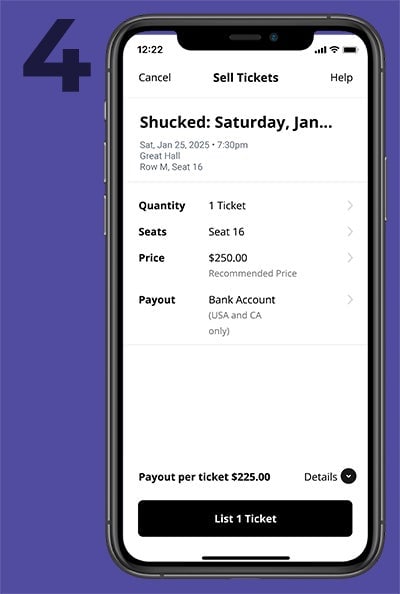
Reselling on SeatGeek is designed to be straightforward. In the app or desktop site, navigate to the "Tickets" section and select "Sell". Upload the tickets — PDFs, mobile barcodes or account credentials, depending on the event — then specify the quantity and whether they can be split across multiple buyers. SeatGeek suggests a recommended price based on recent comparable sales, but the seller sets the final figure. Once sold, tickets are delivered instantly to the buyer's account, and the seller's payout is released after the event concludes. This post-event payout model protects buyers against last-minute cancellations or invalid tickets.
Transferring tickets to a friend or family member uses a separate "Transfer" tab. Select the tickets, enter the recipient's email address, and send the invitation. The transfer shows as "pending" until the recipient accepts, at which point the tickets move into their SeatGeek account. There is no fee for transfers between SeatGeek users.
All-in pricing means the headline figure includes every mandatory fee. However, the composition of those fees varies: some are set by SeatGeek, others by the venue, team, league or promoter. None are refundable, even if the event is cancelled (the Buyer Guarantee refund covers the total paid, but the fee breakdown is not itemised for reimbursement). Taxes and delivery charges — such as mobile ticket delivery or physical postage — are added at checkout.
Accepted payment methods include credit and debit cards, SeatGeek credits or promo codes (entered at checkout next to the "Have a code?" prompt), and buy-now-pay-later options Klarna and Affirm for eligible events. PayPal is not supported. For international buyers, the platform allows toggling between currencies — including Canadian dollars — and languages via settings in both the app and website.
Listings marked "Standing Room Only" (SRO) or "General Admission" (GA) denote areas without assigned seats. Entry is typically first-come, first-served within the designated zone. Arrival time becomes critical for these tickets, especially at festivals or arena shows where floor access determines proximity to the stage. SeatGeek also sells parking passes for select venues. These appear under a dedicated "Parking" tab on the event page, separate from the main ticket listings. Availability is limited and often sells out before the event tickets themselves.
Create an account and save payment details before a high-demand on-sale to reduce checkout friction. Enable push notifications for price-drop alerts on saved events. Read the Deal Score methodology — it is a guide, not a guarantee — and cross-check seat views using venue seating charts where available. Understand that all-in pricing excludes taxes and delivery, so budget an extra 5-10% at checkout. Finally, keep screenshots of your confirmation and the Buyer Guarantee terms; they are your reference point if a dispute arises.
SeatGeek has matured into a reliable, transparent marketplace for live entertainment tickets. Its all-in pricing, Deal Score metric and post-event seller payout model address the most common pain points in the secondary market: hidden fees, opaque value and buyer risk. The platform's partnerships with major sports franchises and its 2025 TrustPilot leadership suggest it has earned industry trust. For shoppers, the practical advice remains: buy early for high-demand events, use Deal Scores as a filter rather than gospel, and always complete transactions within the platform to retain Buyer Guarantee protection. Whether you are chasing a Champions League night at the Etihad or a festival weekend in Manchester, SeatGeek offers a credible, user-friendly route from search to seat.
Originally reported by sportingnews.com. Adapted for our readers with AI assistance.
Keep reading
Top Stories
Since the Supreme Court overturned Roe v. Wade in 2022, the landscape of abortion rights in the United S...
Top Stories
Top Stories Tamfitronics One evening in May, nursing assistant Debra Ragoonanan’s vision blurred during her shift at a state-run Massachusetts vet...
TAMFIS NIG LTD
Electrical and instrumentation engineering, bid preparation and consulting, IT and software.